This is the third part of the Peripheral Control With HLS series of posts. Head to Chapter 2 for installation instructions and environment setup. Chapter 4 will begin working with PYNQ in earnest.
In this chapter, we'll decide on what constitutes a good starting point. In firmware, the classical "Hello, world" involves the toggling of LEDs using a button or dipswitch. For the sake of tradition, we'll be doing likewise, although we'll build up to flashing LEDs incrementally since there's a lot to digest in just getting the LEDs turned on. A word of warning, however, that HLS isn't intended for these types of "real-time" application; it's meant to produce black-box IP cores that work, as opposed to meeting very specific latency requirements. We won't be pushing the "real-time" constraint too hard, but something to be kept in mind nevertheless.
All of the source code for this post can be found in the leds subdirectory of
the hls repo.
Turning The LEDs On
High-Level Synthesis
First of all, we're going to write our HLS function that'll be synthesised into something which simply turns on a few LEDs. The Pynq-Z2 has four LEDs, and we'll be turning on numbers zero and two.
Navigate to leds/static/vivado_hls where you'll see a few directories and a
tcl script. The tcl script is used to control Vitis HLS without having to go
via the GUI interface, while the directories contain C++ code much like any
regular software project. We'll ignore the workflow for now and instead
concentrate on the source code that'll be synthesised. Let's start by taking a
look at src/leds.cpp. The HLS function is, for the most part,
self-explanatory:
#include "../include/leds.hpp"

void leds_static(ap_uint<4>& leds) {
#pragma HLS INTERFACE ap_ctrl_none port=return
#pragma HLS INTERFACE ap_none port=leds
    leds = 0b0101;
}
First of all, we see the inclusion of a header that certainly isn't in the C++
standard library. ap_int.h defines arbitrary precision (ap) datatypes that are
convenient for firmware. In our case, we're interested in the ap_uint<int>
class, which provides us with an arbitrary width unsigned integer datatype,
whose template parameter is the number of bits. Since we have four LEDs, we
simply need four bits to toggle whether the corresponding LED is on or off,
hence the function argument.
It's worth clarifying from the outset that the function arguments aren't like function arguments in regular software that are placed on a stack and manipulated during runtime. Rather, arguments to this function are the interfaces that the core needs to expose -- in this case we need to be able to interact with four bits that toggle LED states. The synthesised core is specified with RTL, and has no idea about references to variables or whatever else we might encounter in software. Think of the synthesised core as a black box whose inputs and outputs must be included as function arguments.
Next up we have a few preprocessor directives that look a little curious.
Clearly they tell the HLS tools about the inputs and outputs to the core, albeit
using some unknown nomenclature. A full exposition on this topic is well outside
the remit of this post -- the reader should consult the "pragma HLS interface"
section of UG1399 for further details. However, we can try to give a bit of
a TL;DR. Synthesised cores have two types of interface: block and port level
interfaces. The block level interfaces exposes various control signals to the
core, such as resets and interrupts. For our example, we're just statically
assigning the LED states, and clearly we have no use for a block level interface
since we just instantiate the core and let it run without having to interact
with anything else. Hence our designating the return port as ap_ctrl_none. The
port level interfaces allow us to specify how data, i.e. the
"function arguments", are passed into/ out of the core, including protocols
(whether to use things like acknowledgements, ready/valid handshakes, etc.) and
properties such as bus widths and what form the ports take (streams from DDR,
registers, BRAMs, etc.) For our case, the leds port is just going to be fed
with some static bitmap, and so we don't need anything fancy -- we just
designate it as ap_none.
The final part of our code simply assigns the leds variable the bitmap 0101,
i.e. the zeroth and second LEDs should be activated and the first and third
deactivated. And that's it -- we're ready to synthesise the core.
There's also a header in the include/ directory and a testbench in test/,
but these are very much boilerplate that shouldn't require a great deal of
explanation. Instead, let's take a look at that tcl script we mentioned earlier
to drive the synthesis. You'll see that there's quite a bit of boilerplate to
appease the Vitis HLS tools -- setting up projects, targetting hardware, etc.
The script is commented to explain what's happening, but for the most part is
uninteresting until we get to the final four lines. HLS comprises four main
stages:
- Simulation (
csim_design): Pre-synthesis C++ simulation with the provided testbench, generating a simulation binary; verifies that the behaviour of the code is correct. - Synthesis (
csynth_design): Synthesis of RTL from the kernel code. - Cosimulation (
cosim_design): Verification of the RTL using hardware emulation and the testbench used in step 1. - Export (
export_design): Generate the binary of the RTL that can be implemented on the FPGA.
That't it! Now, let's actually build something:
foo@bar~$ vitis_hls -f run_hls.tcl
You'll be met with an overwhelming amount of terminal output, but after a short
while should be told that everything has completed successfully; the final core
that can be instantiated in Vivado can be found in static_leds/impl/.
Generating FPGA Image
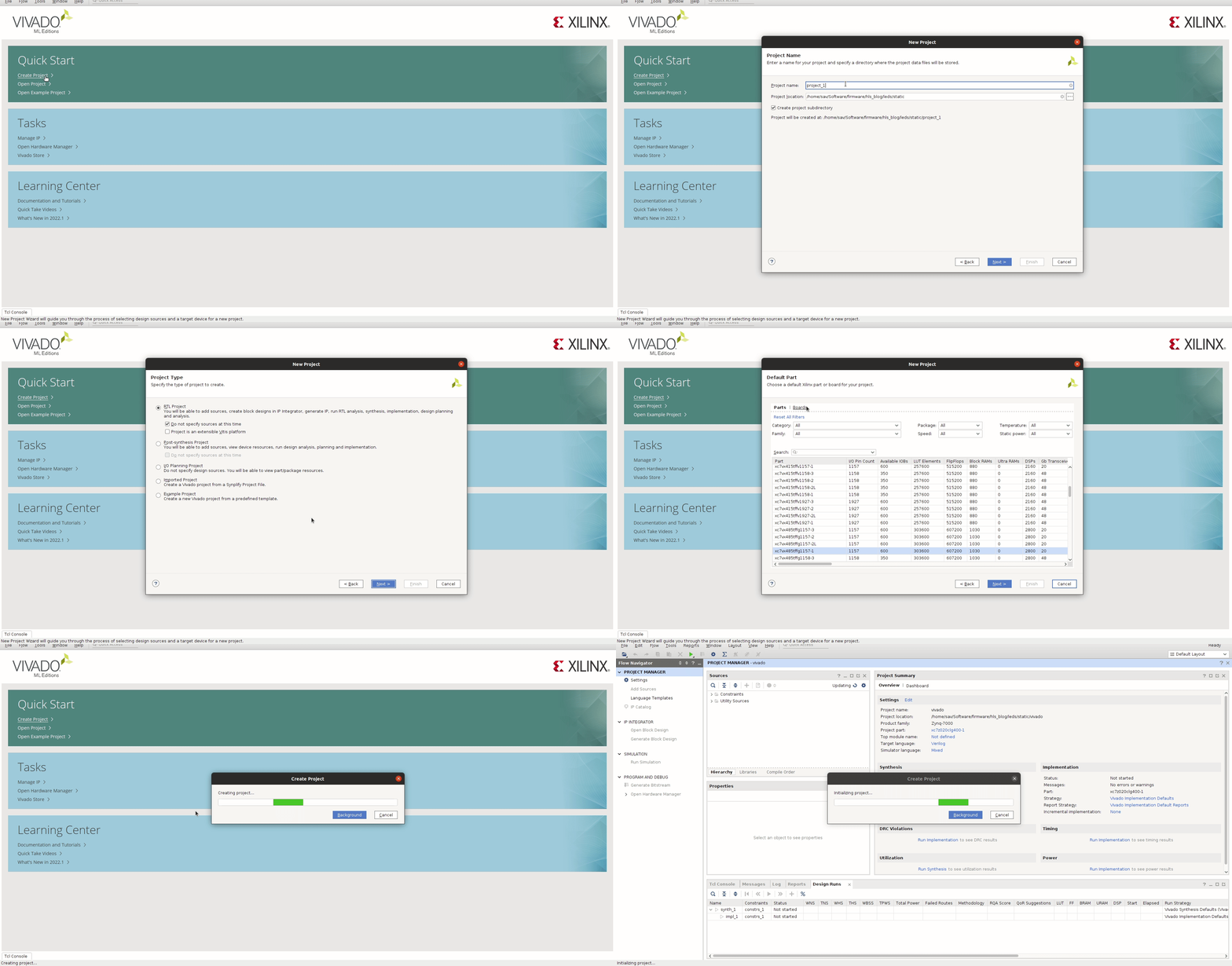
From the leds/static directory we're going to open Vivado and create a new
project that we'll call vivado (Vivado will then obligingly create a
leds/static/vivado directory to place the build when we check the "Create
project subdirectory" box). We want to select the "RTL Project" box but don't
want to specify any sources at this time (since we don't have any HDL to
import). Next up we'll be asked to specify a part, so head to the "Boards" tab
and select the Pynq-Z2.
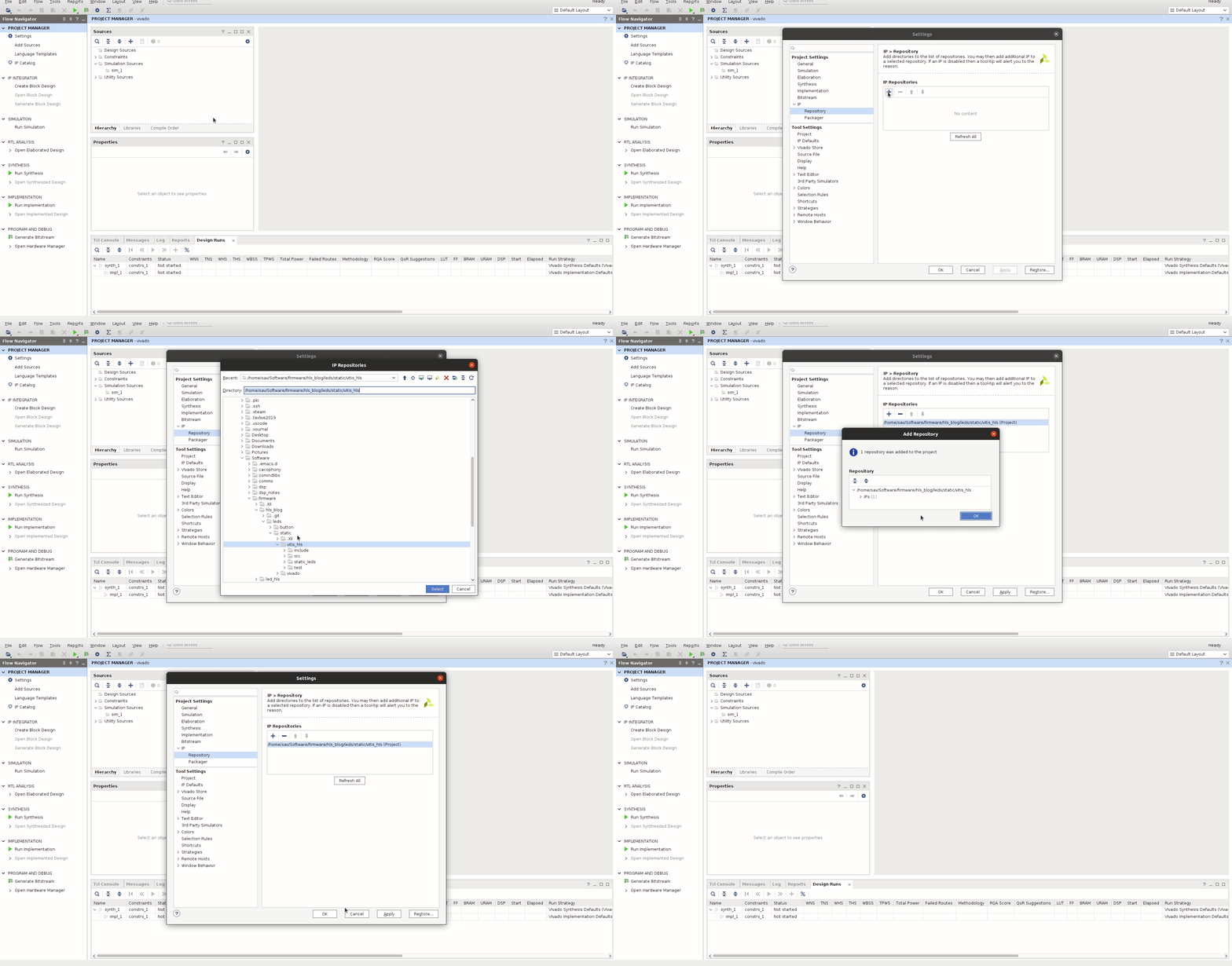
Now that we have a project created, we need to import the IP that we generated
with Vitis HLS. This is done through inclusion of a repository containing
the synthesised IP core, and can be configured through the "Settings" as seen
in the figure below. You'll see that inclusion of leds/static/vitis_hls as
a repository makes the Static_leds IP available for us to use in Vivado.
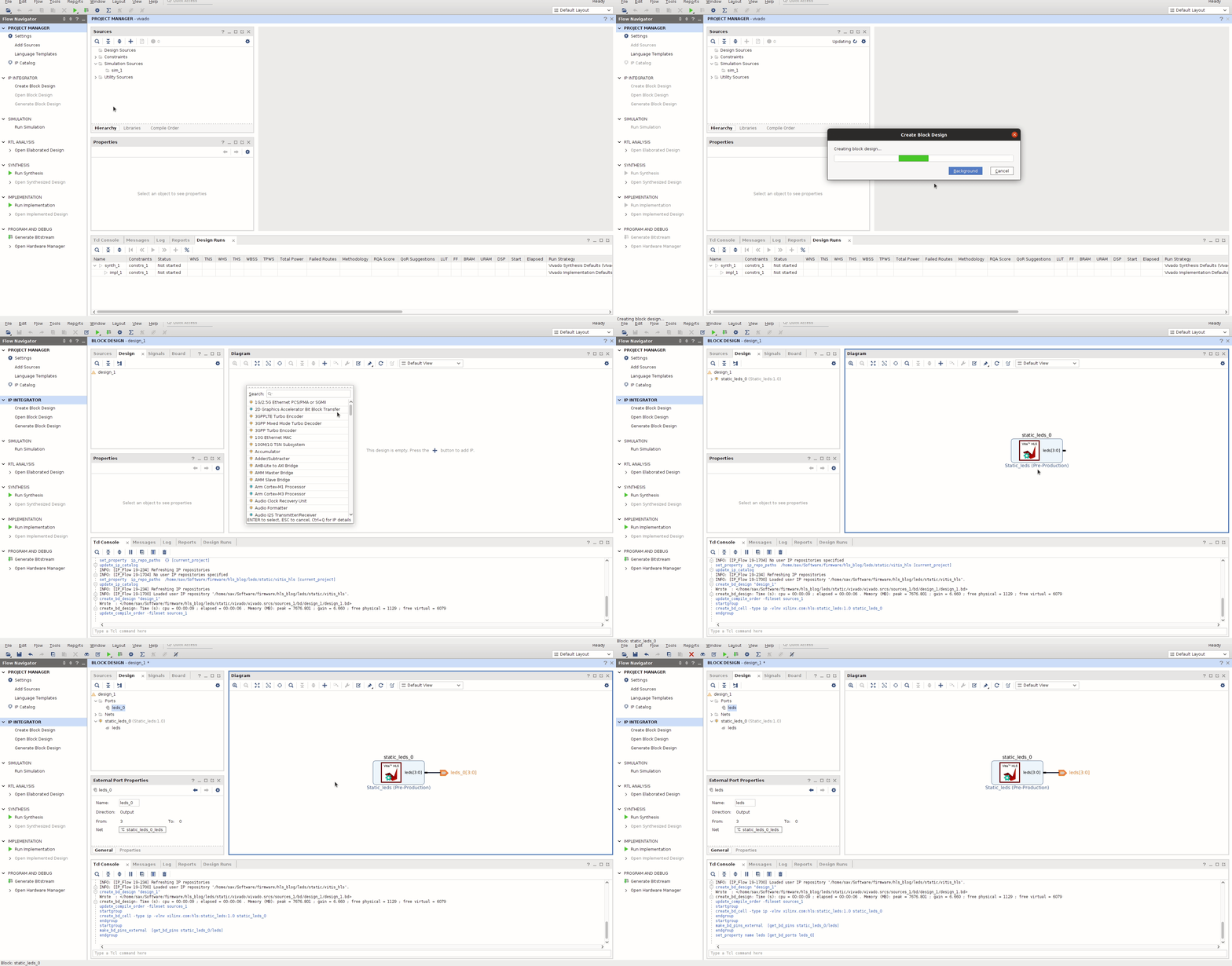
We can include the IP block that we've just imported through the
"Create Block Design" option. We're not too concerned with the design name so
just continue through until Vivado provides you with an empty canvas, prompting
you to add a block. Press the plus sign and you'll be presented with a list of
available blocks that can be included in the design; in this case, we're after
the Static_leds block, so select this and Vivado will import the block. The
output from the block, leds, needs to be routed to the LED pins on the PL,
so we'll right-click the port and select "Make External".
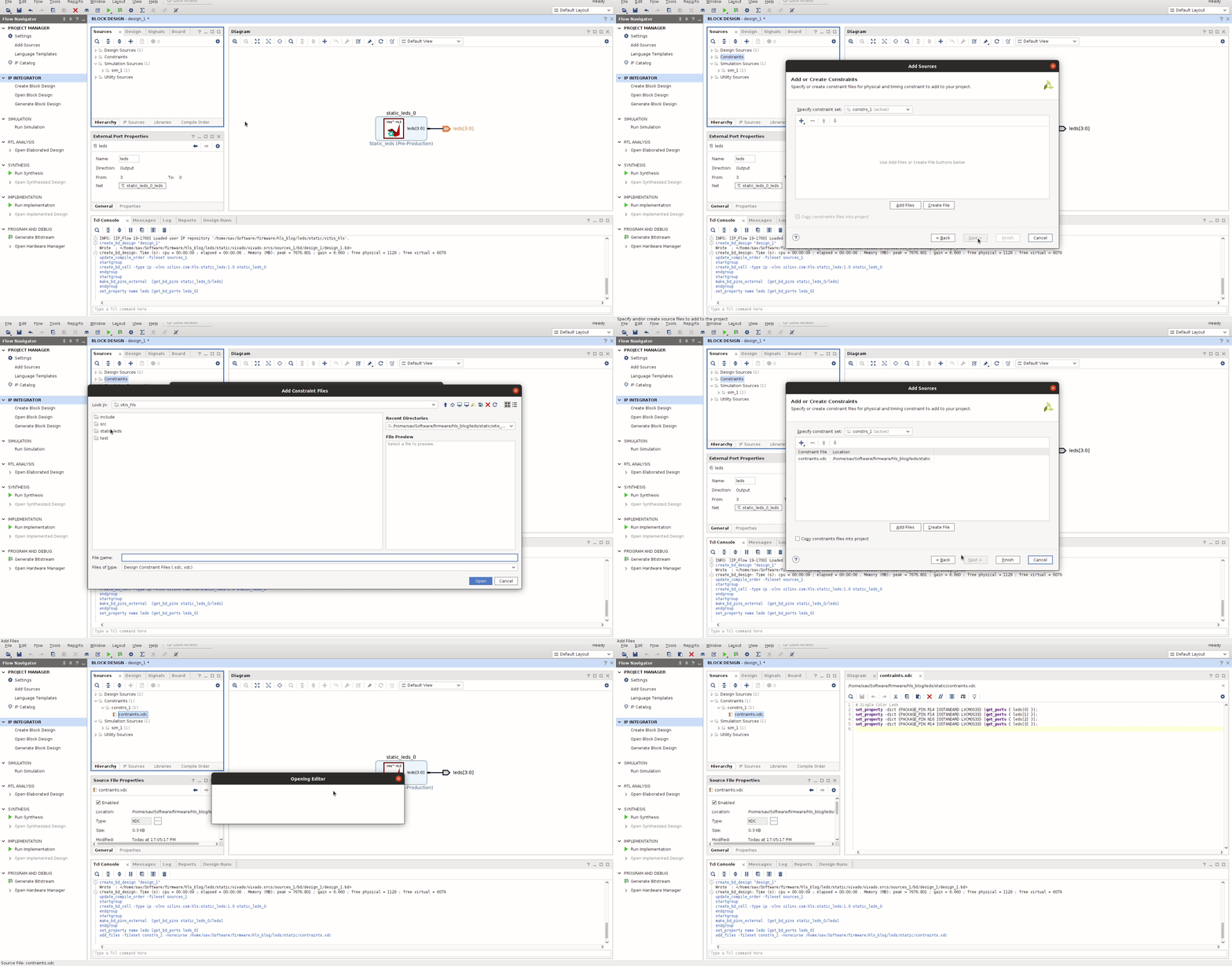
We finished be renaming the leds_0 port to leds to match a particular
convention we've chosen in our "Constraints" file, a file which tells Vivado
about what outputs map to what physical pins on the FPGA. We've included a
constraints.xdc file in leds/static, which we'll now import into our
project. Opening this file, we see that each bit of the leds port maps to
a physical pin (R14, P14, etc.) specified by the Pynq-Z2 schematics.
The final thing we need to do now is generate a HDL wrapper which reflects
what we've just done in the block designer, i.e. instantiate our synthesised
Static_leds core and make the connections to the outside world. To this end,
we need to right-click on the "design_1" in "Design Sources" and select
"Generate HDL wrapper".
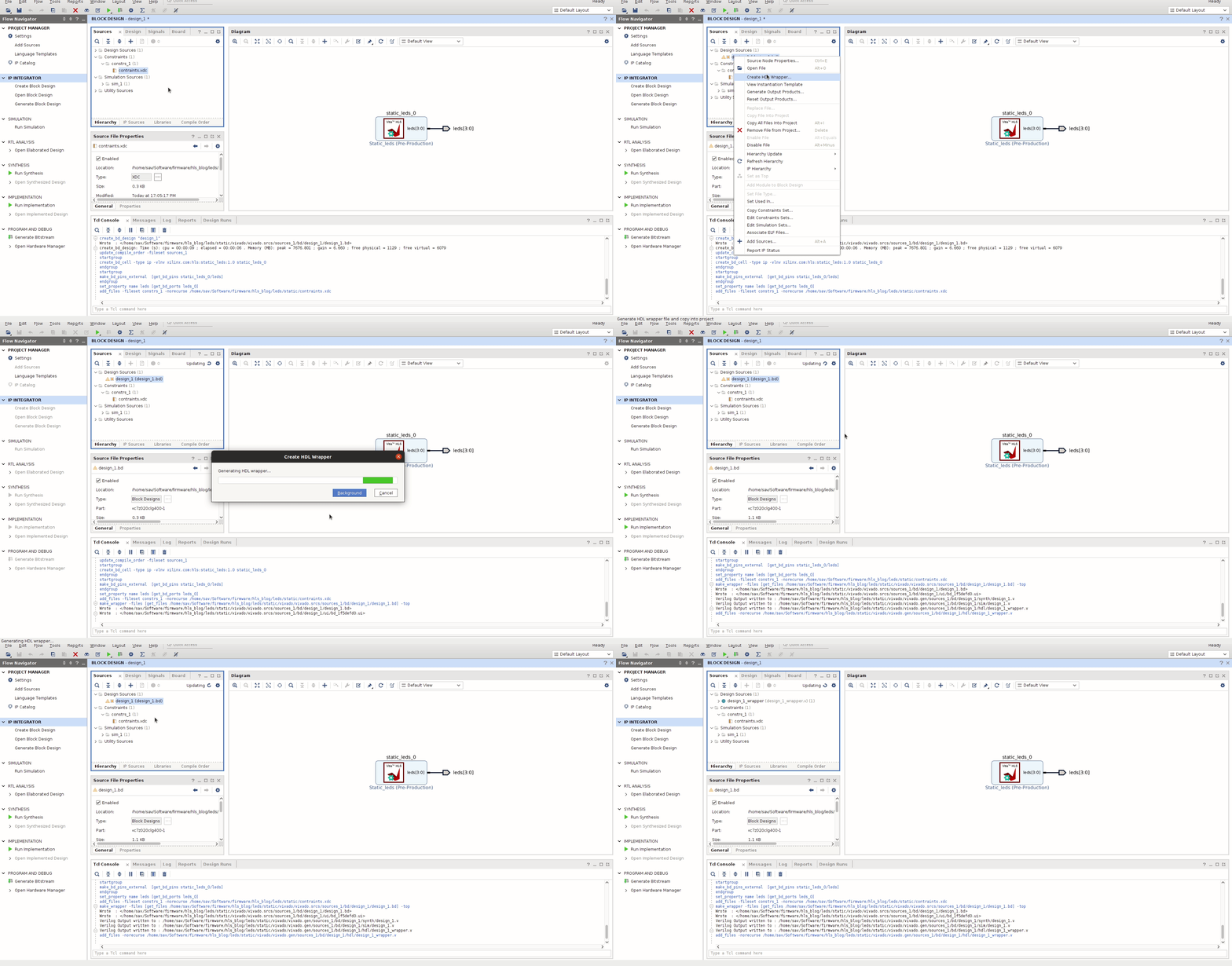
All that remains is synthesising our design (i.e. generating the netlist from the RTL in the HDL that we've generated), implementing it (i.e. doing the place-and-route of the netlist on the hardware we've selected) and finally generating the bitstream that can be used to program the FPGA. This is all helpfully signposted in Vivado by big green arrowheads, so select the "Run Synthesis" and click your way through the dialog boxes that are presented to you on completion of each step. This will likely take a few minutes, but once done we're ready to deploy our bitstream on the FPGA. So switch on the Pynq-Z2 and use the "Hardware Manager" within Vivado to program your device.
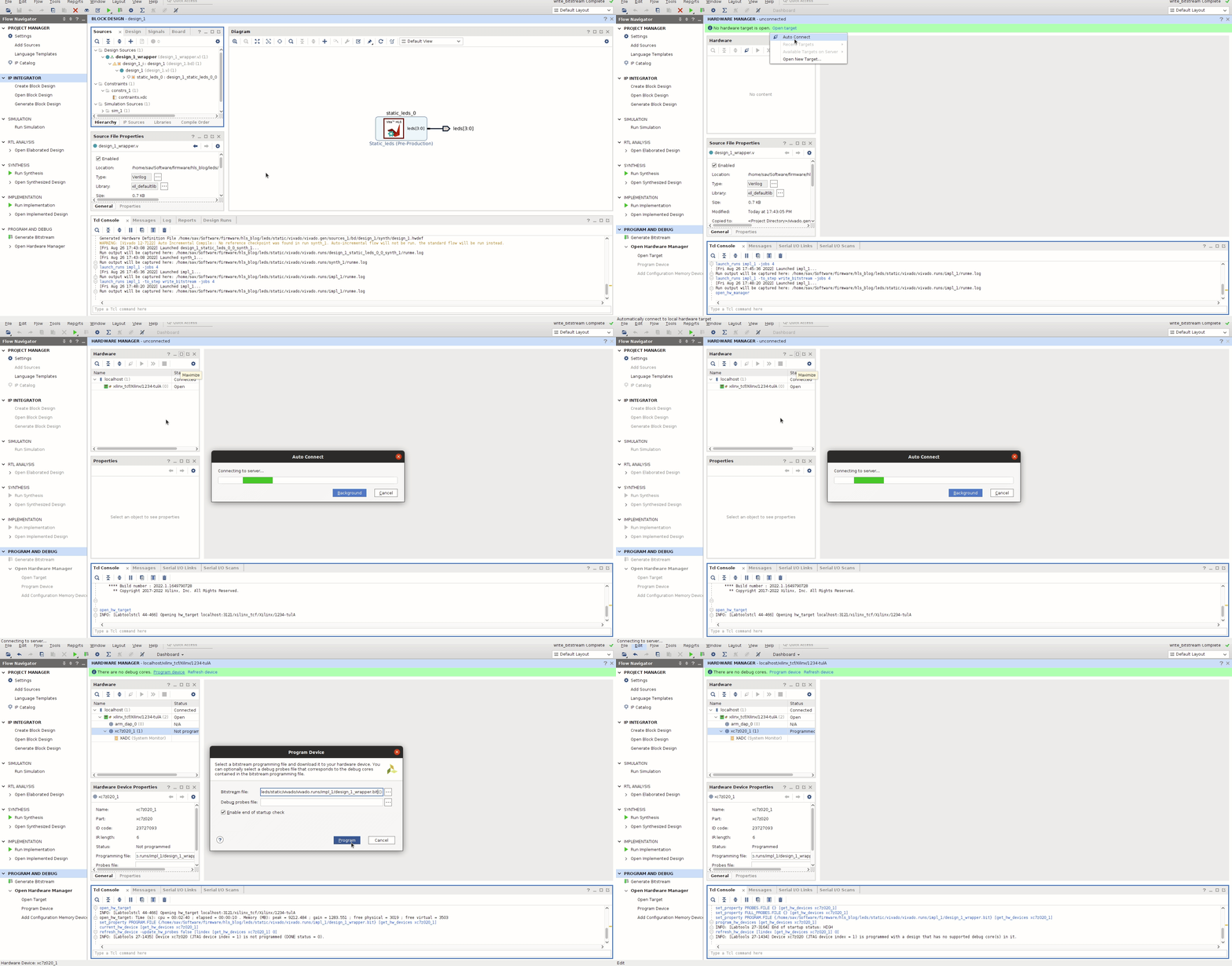
If you've done everything right, you should see the zeroth and second LEDs on your board light up. Congratulations! You've gone from writing a small C application to deploying a functional FPGA configuration!
Connecting LED State To Buttons
All of the previous section was mightily impressive, but naturally you'll be a
little underwhelmed after a moment or so. So let's try to spice the example up
a little -- let's make the LED flashing a little more interactive. Conveniently
enough, there's a push button beneath each LED, so let's make it so that each
push button toggles the LED that's above it. Head over to
leds/button/vitis_hls/src and you'll see another synthesisable function.
#include "../include/leds.hpp"

void button_leds(const ap_uint<4>& btns, ap_uint<4>& leds) {
#pragma HLS INTERFACE ap_ctrl_none port=return
#pragma HLS INTERFACE ap_none port=leds
#pragma HLS INTERFACE ap_none port=btns

    static int timeout[4] = { 0 };
    static ap_uint<4> led_state = 0b0000;

    for (int i=0; i<4; ++i) {
#pragma HLS unroll
        if (btns[i] == 0b1 && timeout[i] == 0) {
            led_state[i] = !led_state[i];
            timeout[i] = 10000000;
        } else if (timeout[i] > 0) {
            --timeout[i];
        }
    }

    leds = led_state;
    return;

}
This hopefully won't present too much of a leap in complexity. We have a new
input to our function, btns, representing the state of each button beneath
the LEDs; when the bit is high, it means the button has been pressed. So we
need to iterate over each button-LED pair and check the button state, toggling
the corresponding LED if the button has been pressed. This all necessitates a
couple of static variables (i.e. variables which retain state between function
invocations): timeout and led_state.
timeout has a physical justification. Our design is going to be clocked at
100MHz or so, and so the synthesised core will be checking the state of the
button each 10ns. Now, unless you happen to have reflexes which allow you to
press and release a button within 10ns, we're going to need to stop the core
from toggling the LED millions of times when we press the button. timeout
is set to some large number once the button has been pressed; unless timeout
is zero, the LED state won't be toggled. Otherwise, timeout will just be
decremented on each clock cycle, without affecting the LED state. In this way,
we can adjust the value that timeout is reset with to effectively make the
corresponding LED unresponsive until it is expired. Since our clock period will
be roughly 10ns, we'll set the maximum timeout to ten million, thereby giving
us 100ms to press the button and release it.
led_state is a little more subtle. Think about eventually drawing this block
in Vivado; to toggle the LED state, we need to know it's previous value, which
means the LED state is both an input and an output to the block. This is a
little problematic when the port maps directly to an external pin, and Vivado
will complain about loops in our design. As a result, we create a static element
in our function that retains the LED state within our block; it's the
led_state that gets toggled in our function, and the leds output is just
assigned the value from led_state.
The final bit of syntax we've introduced is another preprocessor directive:
#pragma HLS unroll. This tells the HLS tools that each iteration of the
loop is independent of the others, i.e. each LED state depends on its
corresponding button state. As such, the HLS tools are free to unroll the loop
and instantiate each iteration as an independent pipeline in the FPGA, as
opposed to making a pipeline, resulting in a reduced latency of the core. We're
starting to stray into optimisations territory here though, so we'll defer
further discussion of this to another chapter.
Perform the synthesis using the included tcl script and fire up Vivado like we
did in the previous section. We want to copy all of the instructions up to and
including the point where we make external connections for btns and leds.
At this point, you'll notice that Vivado is suggesting we do something called
"Run Connection Automation" in a green bar above the block design area. You'll
also see that there are two ports on our block that weren't included in the
HLS source; ap_clk and ap_rst -- where did they come from? We certainly
didn't include them in the HLS source. The HLS tools recognised that the
latency of our synthesised block would be non-zero; there's some data-dependency
in the function (timeout needs to be checked whether it's zero, after which
led_state can be inverted if btns is high, then leds needs to be assigned
from led_state -- all of this can't happen in a single cycle). As such, a
clock is required to be input to the block to drive the block forwards. Contrast
this with our previous block where we just assigned leds some fixed value --
Vitis HLS deduced there's nothing dynamic going on here so required no clock.
If we run the connection automation, Vivado will include a clocking module in
the design, generating a clock source to provide to our synthesised block.
We'll then be met with another green banner asking us to "Run Connection
Automation" once more to try and connect the clock module to our block. Proceed
with this and the tools will do all of the hard work for us. You'll notice that
both a sys_clock and rtl_reset external connection will appear in the block
design. The sys_clock is just the system clock that the Zynq chip provides
(for our chip, it's at 125MHz, hence why we need the clocking module to slow
this down to 100MHz for our design). The rtl_reset is an accompanying reset
signal for the clocking module that we don't particularly care about; you'll see
in the provided constraints.xdc, this port is mapped to one of the dipswitches
on the Pynq-Z2. The reset needs to be mapped to something -- it's active high
(i.e. when the line is high, the clocking module will be continually reset) --
and the dipswitch can be kept low. You can play with this later and see if you
turn the dipswitch on, the behaviour of the LEDs will be all screwy.
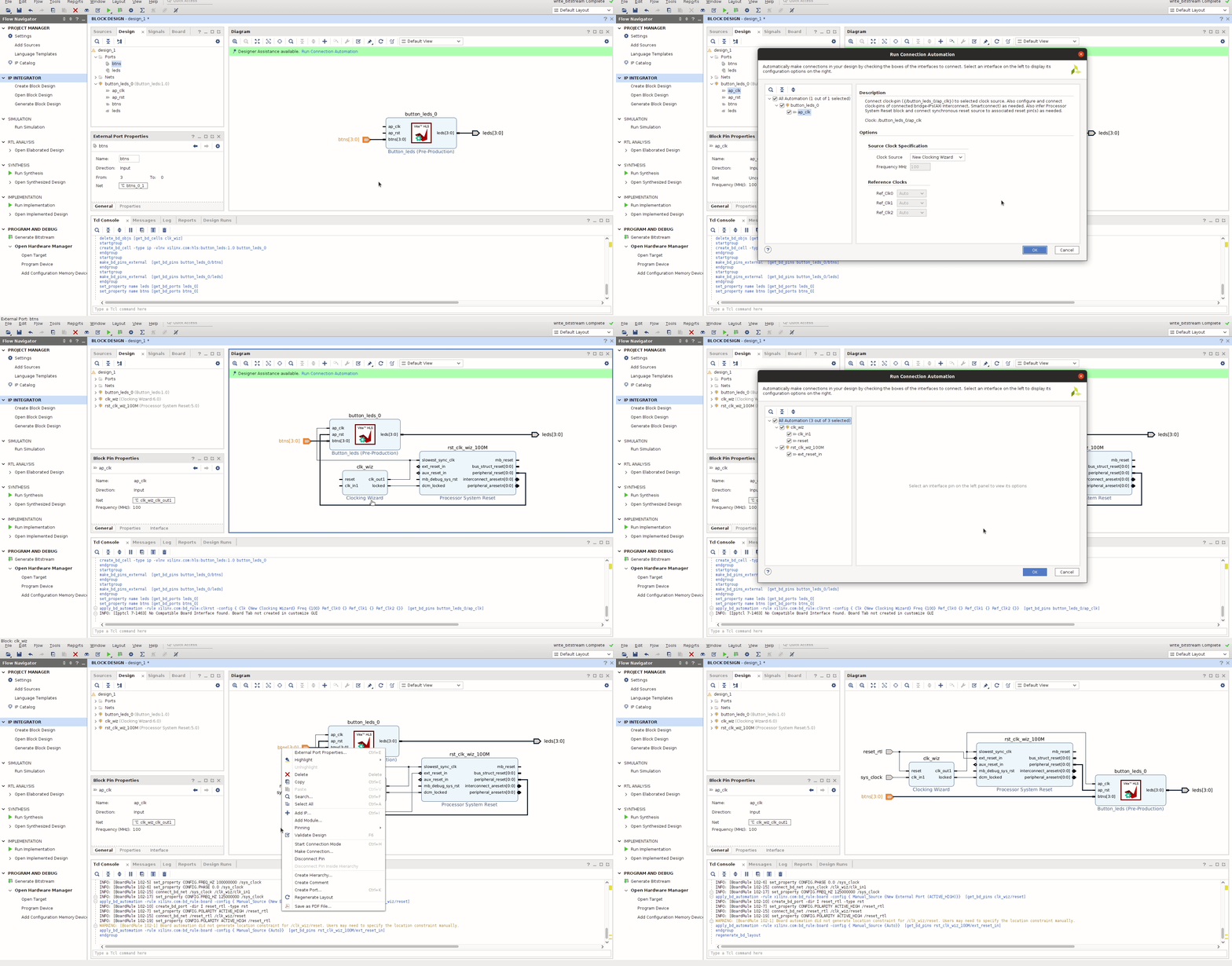
Now we're all set to synthesise, implement and generate a bitstream to program the device with as before. So go ahead and do that, then marvel at your ability to turn LEDs on and off!
Final Remarks
That should suffice for this chapter. We've used both Vitis HLS and Vivado to play with some LEDs and buttons on the Pynq-Z2 board, which is typically where hardware tutorials end for a first effort. In the next chapter, we'll get onto interfacing with hardware components using the PS of the Zynq chip.
Comments